

Loading...
Loading...
A practical guide to HITS click tuning, 8K polling tradeoffs, battery impact, and whether SUPERSTRIKE fits your game, grip, and budget.
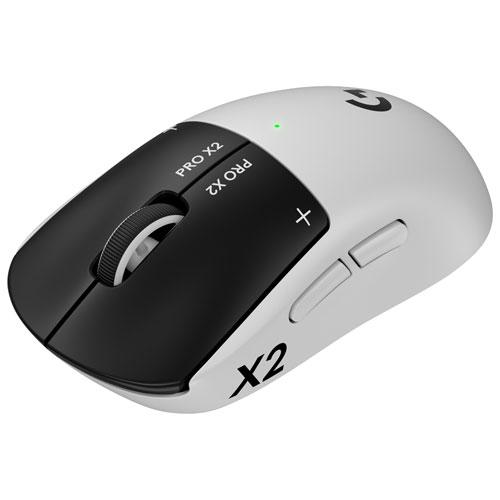
60g
HERO 2
8000Hz
Ambidextrous
The Logitech G PRO X2 SUPERSTRIKE is not just another PRO shell refresh. It is a different click architecture with a familiar shape wrapped around it. Instead of fixed on/off switch behavior, Logitech gives you software-defined actuation and reset control using HITS (Haptic Inductive Trigger System). The result is a mouse that can feel dramatically faster in click-heavy games, but only if you tune it correctly and accept the tradeoffs that come with that performance.
At a high level, SUPERSTRIKE solves an old mouse problem: fixed click behavior. Traditional mechanical switches rely on physical contacts and debounce logic. Optical switches remove contact bounce, but still behave like fixed binary gates. HITS changes that by measuring button travel continuously, then letting software decide where a click starts and where it resets. That one change cascades into real differences in click timing, CPS ceiling, and how "safe" or "hair-trigger" the mouse feels under pressure.
HITS uses electromagnetic induction to track button position in real time. In plain terms: the mouse is not waiting for a single physical "click event" from a fixed switch point. It is watching button depth as a continuous signal. That means actuation can be defined in software instead of locked by hardware geometry. This is the same broader direction we saw in Hall Effect keyboards, now adapted for mouse clicks.
SUPERSTRIKE gives you 10 actuation levels across roughly 0.60-0.65 mm of button travel, plus 5 rapid reset levels. In tactical FPS this can matter: a shallow setting can reduce perceived delay for first shot timing, while deeper settings reduce accidental clicks during tense aim duels. Rapid trigger behavior also allows faster re-fire cadence because the button can reset on tiny upward movement instead of needing a full return cycle.
Because HITS removes traditional switch feedback, Logitech uses localized haptics to recreate click feel at the exact actuation and reset moments. This is crucial. Without that tactile cue, analog click systems can feel disconnected. With it, most users report the transition from mechanical switches is surprisingly natural after a short adaptation period. You can also tune haptic strength, so the click can feel lighter and snappier or denser and more mechanical.
Under the click system, the motion stack is Logitech's top tier: HERO 2 with up to 44,000 DPI, 888 IPS, and 88G. In real use, the important takeaway is not max DPI hype. The key is consistency at common ranges like 400 to 1600 DPI, clean tracking during fast flicks, and low jitter. SUPERSTRIKE keeps that high baseline while adding click-side innovation.
At 8,000 Hz, the report interval drops to 0.125 ms. On modern systems and high-refresh monitors, this can improve micro-smoothness and reduce input variance. But 8K is not free: CPU interrupt load rises and battery life drops. If you are on mid-range hardware or mostly playing at lower refresh rates, 2K or 4K may be the better stability-to-battery balance.
Logitech rates battery life up to 90 hours in lower-power operating conditions. In practice, high polling plus stronger haptics can cut that sharply. The important planning point is simple: think in profiles. Use one high-performance profile for ranked/tryhard sessions, and one efficiency profile for general play or work.
Weight sits around 60 to 61g, which is light but no longer class-leading in 2026. The shape remains close to the PRO X family, so if you already perform well on that shell, transition is easy. Known complaints remain: side buttons are usable but not elite, there is still no dedicated DPI button on top, and the launch aesthetic is more polarizing than previous PRO generations.
Early launch reports mentioned detection hiccups in G HUB, with some users temporarily relying on Onboard Memory Manager. The practical recommendation is to configure and save one known-good onboard profile immediately, then iterate. For tournament-like reliability, onboard-first setup is still the safest path regardless of brand.
Against SUPERLIGHT 2, the biggest gain is tunable click behavior, not shape. Against Viper V3 Pro, SUPERSTRIKE often wins on click-side flexibility while Razer remains very strong in side-button and shell preference for many users. If your priority is pure click control and trigger tuning, SUPERSTRIKE is compelling. If your priority is price, shell comfort, or simpler setup, alternatives can still be the smarter buy.
Best for competitive FPS players who actively tune settings, players who value click latency and rapid reset control, and existing PRO X shape users who want a faster, more configurable click system. Less ideal for plug-and-play buyers who do not want to tweak profiles, or anyone prioritizing lowest cost over performance headroom.
"The PRO X2 SUPERSTRIKE is one of the most important mouse releases in years, not because of sensor marketing, but because it pushes clicks into the software-defined era. If you will use HITS tuning, it delivers real upside. If you prefer a fixed click feel and simpler value, you can spend less and still play at a high level."
Independent Deep Dive | Affiliate Links Supported